

Unity Catalog Volumes: Unstructured Data for the Agentic Lakehouse
Volumes govern unstructured data in Unity Catalog. Open one in a marimo notebook, build platform experiences on it, and keep agent context in it.
 Robert PackStaff Developer Advocate
The usage of object stores as the storage layer for all kinds of data systems has been on a continuous rise for several years. For analytical workloads, separated storage and compute - a key concept of the Lakehouse Architecture - is the de-facto standard, and even some transactional workloads are following suit.
And while we as a community made great strides managing and governing tabular assets in object storage via catalogs and open table formats, we always kept an escape hatch around. This escape hatch is plain storage; data pipelines read configuration files, data scientists develop ideas as scratch files in some personal storage location, and many more examples where folks need to quickly park something for later use or reference. Even more promiently, the usage of multimodal data (e.g. images, PDFs, videos…) is skyrocketing with the proloferation of agentic workloads.
Those of you building or using data platforms frequently, will already anticipate the issues arising from such patterns: missing discoverability and fragmented governance. You will also recognize these as challenges we already encountered and solved for tabular assets, particularly those based on open table formats.
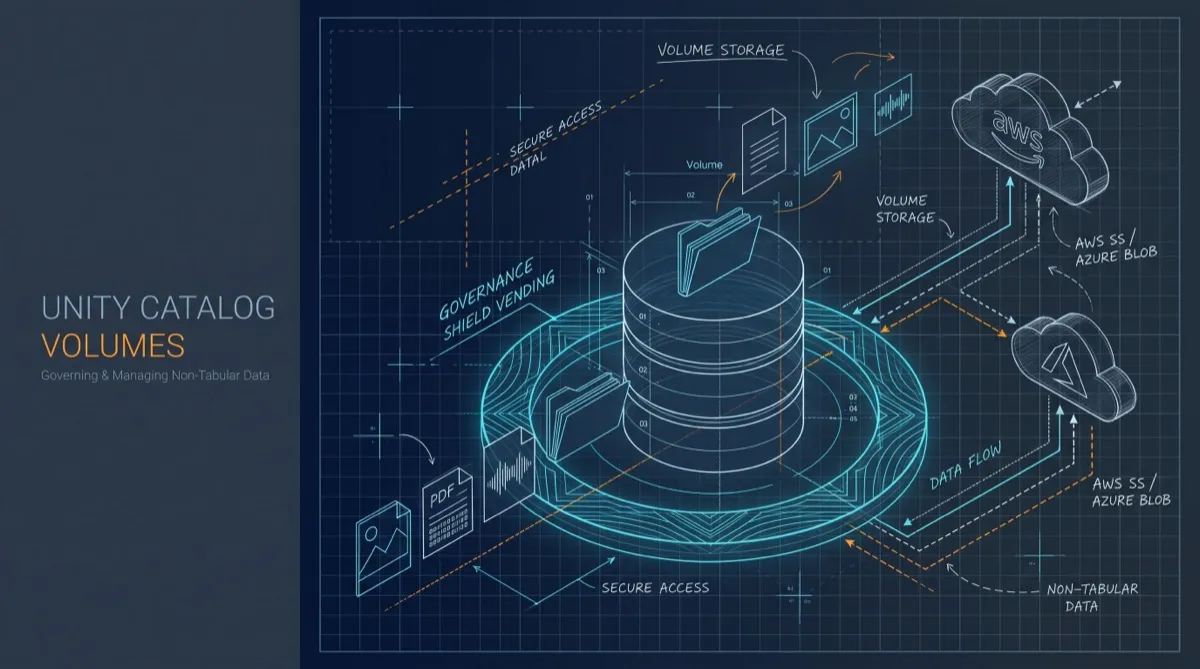
In the following sections we will explore how Unity Catalog leverages well-established abstractions and capabilities to define a Volume securable, and see how Volumes can be leveraged to govern and process unstructured data.
Accessing volumes from a notebook
Say you want to browse a volume from a notebook. marimo lists every obstore store a notebook defines in its Remote Storage panel, where you can browse and download files. Give that store a credential provider that asks Unity Catalog for credentials, and you can open a volume as a store. That provider is small enough to show in full:
class UnityCatalogCredentials:
    """An obstore credential provider that asks Unity Catalog for storage credentials.

    It returns whichever credential the server vends: S3 keys, an Azure SAS
    token, or a Google Cloud OAuth token. `request` is an async function that
    takes an `ApiClient` and returns the server's `TemporaryCredentials`. It
    runs on an event loop of its own, in a background thread, so obstore can
    call the provider from sync methods, async methods, and threads without a
    loop alike.
    """

    def __init__(self, config, request):
        self._request = request
        self._loop = asyncio.new_event_loop()
        threading.Thread(target=self._loop.run_forever, daemon=True).start()
        self._api = self._run(self._connect(config))
        # The first answer gives the store its URL, and a missing grant fails here.
        self._first = self._run(request(self._api))
        self.url = self._first.url

    @classmethod
    def for_volume(cls, config, name, operation=VolumeOperation.READ_VOLUME):
        async def request(api):
            volume = await VolumesApi(api).get_volume(name=name)
            return await TemporaryCredentialsApi(
                api
            ).generate_temporary_volume_credentials(
                GenerateTemporaryVolumeCredential(
                    volume_id=volume.volume_id, operation=operation
                )
            )

        return cls(config, request)

    @classmethod
    def for_table(cls, config, full_name, operation=TableOperation.READ):
        async def request(api):
            table = await TablesApi(api).get_table(full_name=full_name)
            return await TemporaryCredentialsApi(
                api
            ).generate_temporary_table_credentials(
                GenerateTemporaryTableCredential(
                    table_id=table.table_id, operation=operation
                )
            )

        return cls(config, request)

    @classmethod
    def for_path(cls, config, url, operation=PathOperation.PATH_READ):
        async def request(api):
            return await TemporaryCredentialsApi(
                api
            ).generate_temporary_path_credentials(
                GenerateTemporaryPathCredential(url=url, operation=operation)
            )

        return cls(config, request)

    @staticmethod
    async def _connect(config):
        return ApiClient(config)

    def _run(self, coroutine):
        return asyncio.run_coroutine_threadsafe(coroutine, self._loop).result()

    def __call__(self):
        creds = self._first or self._run(self._request(self._api))
        self._first = None
        # expiration_time is in epoch milliseconds.
        expires_at = datetime.fromtimestamp(creds.expiration_time / 1000, tz=UTC)
        if aws := creds.aws_temp_credentials:
            return {
                "access_key_id": aws.access_key_id,
                "secret_access_key": aws.secret_access_key,
                "token": aws.session_token,
                "expires_at": expires_at,
            }
        if azure := creds.azure_user_delegation_sas:
            return {"sas_token": azure.sas_token, "expires_at": expires_at}
        if gcp := creds.gcp_oauth_token:
            return {"token": gcp.oauth_token, "expires_at": expires_at}
        raise ValueError(f"the server vended no credential for {creds.url}")

    def close(self):
        self._run(self._api.close())
        self._loop.call_soon_threadsafe(self._loop.stop)
obstore calls the provider whenever it needs a credential, and each call goes back to Unity Catalog for a fresh one. The first answer also carries the volume’s storage location, which becomes the store’s URL. With that in place, this is the cell that opens the volume:
credentials = UnityCatalogCredentials.for_volume(config, "analytics.ops.files")
files = from_url(
    credentials.url, region="us-east-1", credential_provider=credentials
)
Once the cell runs, the volume shows up under Remote Storage in the Files panel:
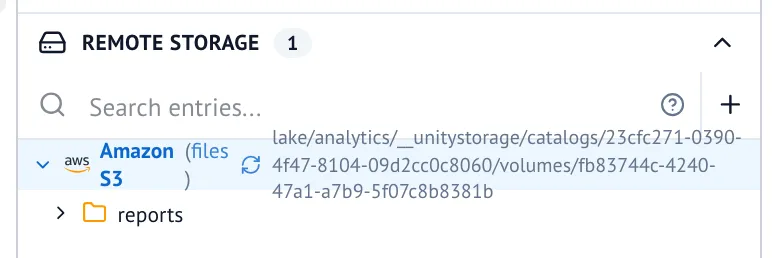
Other cells read through the same store with plain obstore calls. There are no storage keys anywhere in the notebook. The store knows the volume’s name, and Unity Catalog answers with the volume’s storage location and a credential scoped to it.
The governance comes along for free. for_volume asks for READ_VOLUME, so the store can list
and read, and storage itself rejects writes. Writing from a cell means asking for WRITE_VOLUME,
which needs ownership of the volume. obstore renews the credential once less than five
minutes remain, so a long-running notebook keeps working, and since every renewal goes back to
the server, revoking the grant also cuts off a notebook that is already open.
Nothing in UnityCatalogCredentials is specific to marimo. Any tool that accepts an obstore store gets the same volume, with the same grants.
Use volumes as marimo remote storage
walks through the whole notebook, and
Use Unity Catalog credentials with obstore
explains the provider, including how it serves table files and handles S3, Azure, and Google Cloud
credentials.
What makes a volume
So what is it that we just opened? Let’s take a more formal look at what Volumes in Unity Catalog are and what metadata we associate with them.
{
  "name": "string",
  "catalog_name": "string",
  "schema_name": "string",
  "volume_type": "string",
  "storage_location": "string",
  "owner": "string",
  "comment": "string",
  "full_name": "string",
  "volume_id": "string",
  "metastore_id": "string",
  "created_at": 0,
  "created_by": "string",
  "updated_at": 0,
  "updated_by": "string",
  "access_point": "string",
  "browse_only": true
}
The first thing to note is that Volumes are a first class data asset organized within the catalog/schema hierarchy. As such they are governed and discoverable just like other assets. In the same vein, you can supply comments to clarify the intended use of a volume.
The most relevant piece of information though is the storage location. This can be any path under
a previously registered external location or automatically created when the location is MANAGED
by Unity Catalog. Using the same credential vending
mechanics we already employ for tables via the
temporary credential APIs
and of course the Unity Catalog Delta API and IRC protocol implementation in UC, we have battle-tested
abstractions to negotiate access to volumes. That is exactly the API the marimo store calls.
From one notebook to a platform
As we see, using storage credentials, external (or managed) locations, and a path, we have defined a Volume abstraction. While this already solves a lot of the aforementioned discoverability and governance issues we identified, it is worthwhile to take a step back and step into the shoes of someone designing and building an on-prem data platform. What key experiences does this person want to offer their users?
Going out on a limb here, but likely users expect some sort of notebook environment and maybe
a SQL editor experience to interact with the data stored on the platform. The marimo panel above
is the read side of that story. The other side is that notebooks themselves usually manifest as
some sort of file, be it .ipynb, .json, or plain .py files. In case of a SQL editor, you might
want to persist state not only in the browser, but make it resumable and shareable by storing it
as a .sql file. In fact embedding a text editor to display and edit SQL will get you a long way
towards an incredibly rich editing experience.
By introducing system schemas and/or injected configuration into existing tooling, platform engineers can leverage volumes to build such file-centric experiences with discoverability and governance built in from the ground up, not as an additional application-specific layer bolted on after the fact. Injecting a credential provider into a notebook kernel, so every user’s notebook sees the volumes they are granted and nothing else, is one such integration point.
But that is not all.
Volumes as AI primitive
In today’s world no platform story is complete without agents and AI as primary interfaces. So why are we boring you with plain old storage when there are so many more exciting things to talk about? Well, if we look under the hood, much of what we hand to an agent is just instructions (usually markdown files) along with file-based resources and scripts referenced in these instructions.
Take AGENTS.md, a convention for telling coding agents how to work in a
project: a markdown file at a well-known path, pointing at whatever else the agent should read.
Nothing about it requires a git repository. Put the instructions and their references into a
volume, and its owner decides who can read them, with the same READ_VOLUME privilege that
already governs their data. An agent then reads its
context through the same vended credentials the notebook above uses. The files an agent
produces, such as reports or generated notebooks, can land in a volume the same way, and the
WRITE_VOLUME check applies to the agent just as it does to a person.
Beyond extending the abilities of your agents via such direct integrations, the community at large is also hard at work to provide a semantic layer on top of the Lakehouse. And while this is an expansive and evolving field including the recently announced metric view support in Unity Catalog, by now you might not be surprised to learn that Volumes are again a great primitive to build part of your semantic layer.
The idea of an LLM-wiki
quickly gained traction, and got formalized via the Open Knowledge Format.
By design this is a very lightweight specification, with the only hard requirement to put a
type field into the frontmatter of a markdown file.
Again we see that the fundamental building block is ultimately files. The power comes from the well known UX concept of progressive disclosure, which just so happens to align nicely with how we want to populate agent context, loading only the pieces into context that are relevant to the task at hand. Individual pages of such a wiki along with the relations to other concepts in the knowledge graph can effectively be shared using the OpenSharing protocol, particularly pages.
Wrapping Up
Every now and then we come across concepts that seem obvious in retrospect and are simple yet incredibly powerful upon closer examination. To me, volumes are just that, a governed, secured, and discoverable storage location that provides significant value on its own, and serves as a key building block for a wide range of use cases across AI, agents, and platform engineering.
If you want to try it yourself, these pages from the Unity Catalog docs get you there:
- Manage volumes to create a volume and see which privileges reading it takes.
- Working with volumes and files to register a folder of documents as a volume and read it knowing only its name.
- Use volumes as marimo remote storage for the notebook from this post.
- Use Unity Catalog credentials with obstore to take the same credential provider into your own tools.
Go build!

Unity Catalog 101
Unity Catalog is a data catalog for managing all your data and AI assets easily and securely. You can use Unity Catalog to organize your data assets, collaborate, manage data access, and ensure compliance with data regulations.
Authentication and Authorization in Unity Catalog
This article explains authentication and authorization in Unity Catalog, emphasizing their role in secure data governance. It provides a step-by-step guide to configuring Unity Catalog with external identity providers like Google Auth, ensuring centralized identity management, enhanced security, and scalability for modern data pipelines.

Avoid Data Silos with Unity Catalog
Data silos split data across tools, creating duplication, inconsistency, and security gaps; Unity Catalog centralizes governance and access so teams share trusted data for analytics and AI.